Basic IO
Overview
This lab is a simple introduction to programming pin inputs and outputs for the ESP32/Arduino. If you want to challenge yourself, try completing the objectives below in order before referring to the example code!
Objectives
- Turn on LED
- Blink LED every 1 second
- Make LED only turn on when holding a button pressed (Using on-board button)⭐︎
Wiring Diagram
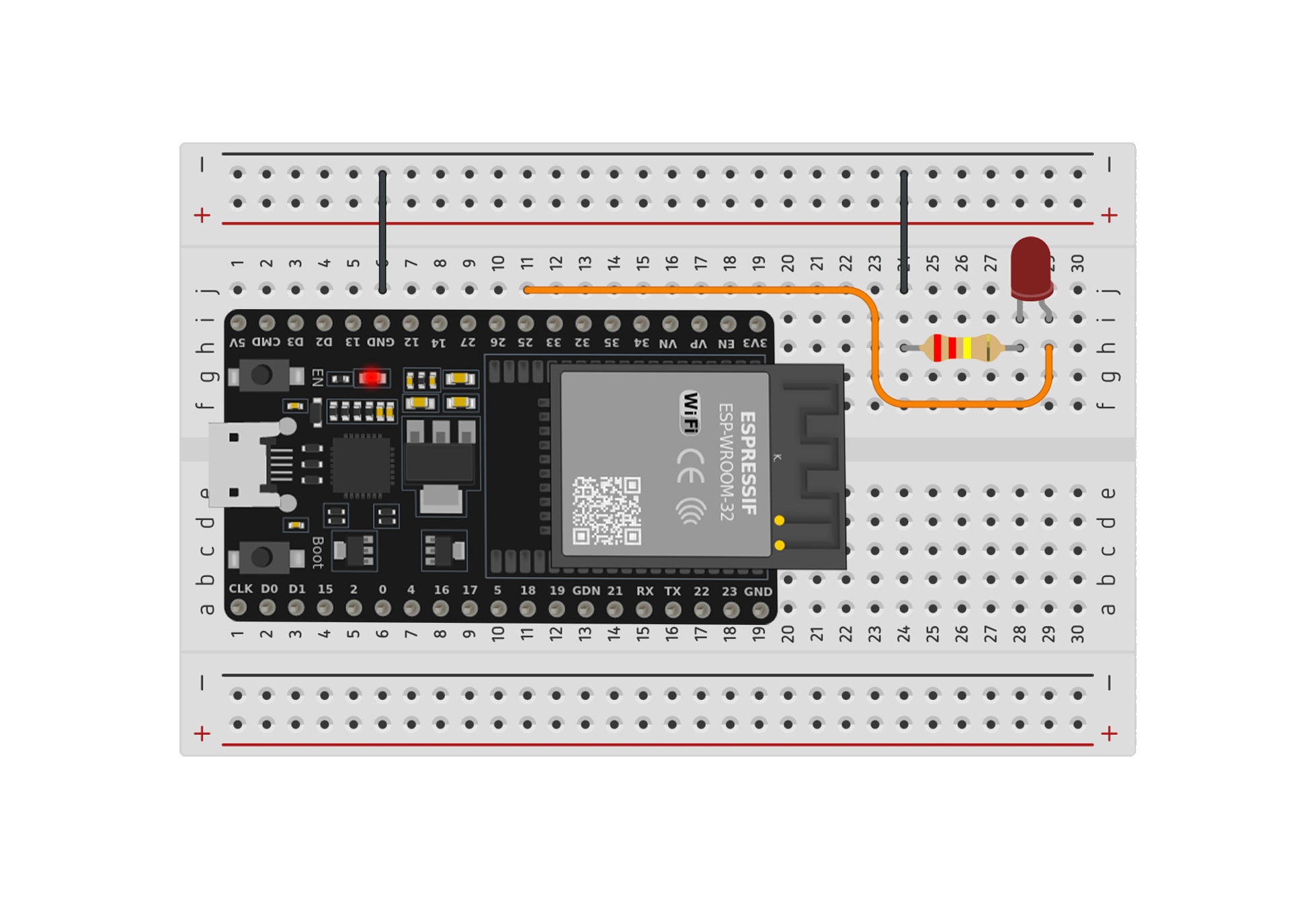
Code Solutions
- Basic
- Advanced
#include <Arduino.h>

#define LED_PIN 25       // Defining LED pin number
#define BUTTON_PIN 2    // Defining button pin number

void setup() {
    pinMode(LED_PIN, OUTPUT);           // Initializing LED pin as an output
    pinMode(BUTTON_PIN, INPUT_PULLUP);  // Initializing button pin as an input
}

void loop() {
    // Checking if button is pressed
    if (digitalRead(BUTTON_PIN)) {
        digitalWrite(LED_PIN, HIGH);    // Turning LED on
        delay(1000);                    // 1000ms delay
        digitalWrite(LED_PIN, LOW);     // Turning LED off
        delay(1000);                    // 1000ms delay
    }
}
#include <Arduino.h>

#define LED_PIN 25           // Defining LED pin number
#define BUTTON_PIN 2        // Defining button pin number

bool isLEDOn = false;       // Creating variable with LED for representing the current LED state
long ledSwitchDelay = 1000; // variable representing the delay between state switches
long lastSwitch = millis(); // variable representing the last timestamp at which the LED state was switched

void updateLEDState();      // Declaring update method from below

void setup() {
    pinMode(LED_PIN, OUTPUT);       // Initializing LED pin as an output
    pinMode(BUTTON_PIN, INPUT_PULLUP); // Initializing button pin as an input
}

void loop() {
    updateLEDState(); // Calling update method
}

void updateLEDState() {
    // Checking if button is pressed
    if (digitalRead(BUTTON_PIN)) {
        if ((millis() - lastSwitch) > ledSwitchDelay) {     // Checking if it has been longer than ledSwitchDelay (1000ms)
            lastSwitch = millis();                          // Setting last switch time to current time
            isLEDOn = !isLEDOn;                             // Flipping LED state (! represents "not")
            digitalWrite(LED_PIN, isLEDOn ? HIGH : LOW);    // Turning LED on/off depending on LED state
        }
    } else {
        // Disabling LED if it's on and button is not being pressed
        if (isLEDOn) {
            isLEDOn = false;            // Setting LED state to off
            digitalWrite(LED_PIN, LOW); // Turning LED off
        }
    }
}
note
One of the major differences between the basic and advanced programming solution is the fact that the advanced solution is non-blocking. Since we are not triggering a delay in the main loop, other components of your script/program can continue to run while waiting for the next LED state switch